

How do you check a link before logging in?
A domain, message and login-page checklist to reduce the risk of giving information to an impersonation site.
Read articleCheck the destination before sharing account information.
By Kassandra A. Marcos · Published 2026-11-01 · Updated 2026-11-01
Open the brand-confirmed main platform, a66.city, and check the address before using the Log Masuk form. The explanation below is based on the public interface inspected without signing in; it does not claim that actual account access was tested.
Use the platform link provided on this blog and read the full domain in the address bar. Avoid entering through urgent messages whose origin cannot be verified. Padlocks and logos can appear on impersonation sites. If the browser shows a warning or redirects to an unexpected domain, stop and seek confirmation.
On 1 November 2026, the public Log Masuk page displayed Nombor Telefon / Nama Pengguna and Kata Laluan fields and a LOG MASUK button. The following route opens it: https://a66.city/#login. Enter account details only after checking the destination. We did not enter credentials, submit the form or test error messages; no login outcome or response time is promised.
The public form's Terlupa Kata Laluan link opens the TUKAR KATA LALUAN screen. The initial screen inspected showed a No Telefon field and TUKAR KATA LALUAN button. Screenshots show empty forms. Steps after submission, verification methods and recovery when the phone number is unavailable were not tested; opening the first screen does not mean recovery is complete.
Use a unique password so a breach at another service does not expose the same account. Do not share OTPs, PINs, passwords or recovery codes in conversations. If a service offers additional security controls, read its official explanation first. This article does not assume Alibaba66 offers a particular MFA method or code type.
Do not repeatedly try password variations without knowing the account rules. Record the actual message and time without copying secrets. Open Hubungi Kami in the platform for instructions relevant to your situation. Blog errors belong with the editors. Specific account-error troubleshooting remains unpublished until the messages and steps can be verified.
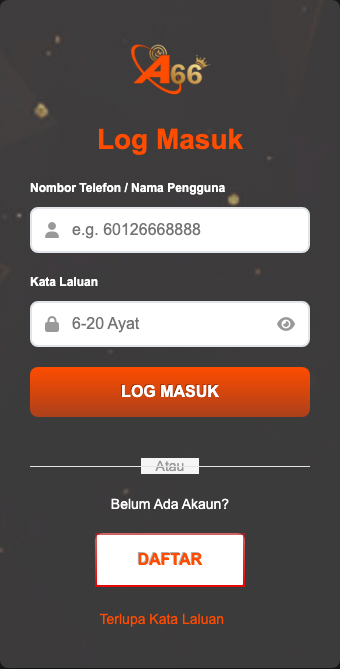
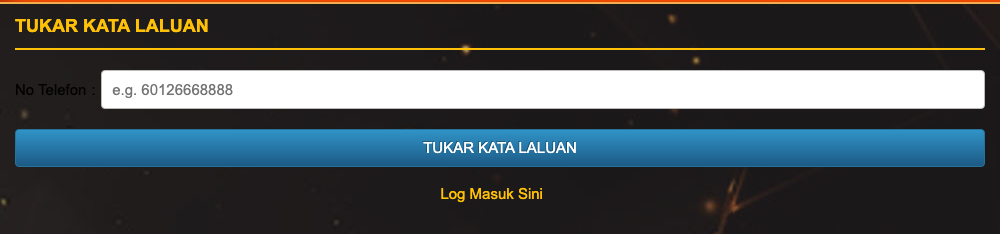
Public-interface check: 1 November 2026. No forms were submitted, accounts accessed or transactions performed.
A domain, message and login-page checklist to reduce the risk of giving information to an impersonation site.
Read articleA practical workflow for unique passwords, password managers and recovery access without exposing account secrets.
Read articleRecognise urgency, impersonated addresses and attempts to obtain an OTP before acting on a message.
Read article